Surveillance
| Networking | |
| Hostname | vms |
| IP | 10.0.3.3, 10.0.9.3 |
| Virtual Machine | vms |
| Website | http://10.0.9.3 |
| Software | |
| OS | Windows 10 |
| Version | Milestone 2017 R3 |
| Last Updated | December 2017 |
| Hardware | |
| CPU | 1 |
| Memory | 4GB |
| Network | CAM, DMZ |
| Storage | 80GB (SSD, thin) |
Cameras
There are currently four Hikvision DS-2CD2335-I cameras. Two are 2.8mm (wide) and two are 4.0mm (narrow).
- cam-backyard 10.0.3.7 (wide - 2.8mm)
- cam-driveway 10.0.3.8
- cam-frontyard 10.0.3.6 (wide - 2.8mm)
- cam-leftside 10.0.3.9
Use Hikvision SADPTool to configure from factory
There is one Xiaomi Xiaofang Camera in my room. It is on the Admin network as it connects over Wi-Fi. The Xiaofang camera has hacks applied to it from https://github.com/samtap/fang-hacks which allows it to provide an RTSP feed to Milestone, via VLC. The default credentials are root:ismart12.
- cam-xiaofang 10.0.1.129
Special firewall rules are also in place to allow a connection from the Milestone server to the camera.

Milestone XProtect Essential
Milestone XProtect Essential is the free VMS being used.
Limitations include:
- 8 cameras max
- No built-in motion detection/alerts
- Popups
- Logo on video exports
Settings
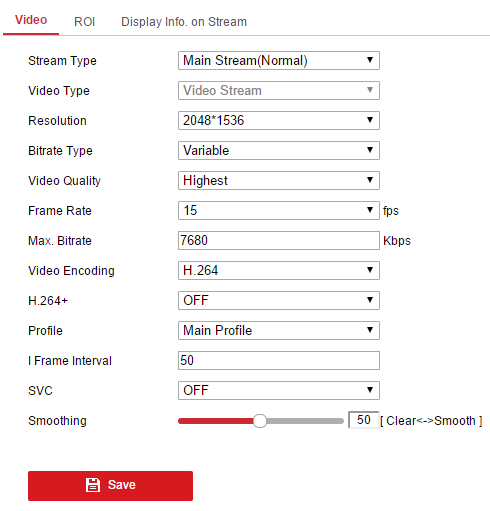
XProtect Essential 2016 R3 25 day retention (3 for Xiaofang) 15FPS 7680 Bitrate (Variable) H264 Resolution 2048 * 1536
Storage
SSD (C:\) provides the OS and Milestone software.
A Seagate Skyhawk 8TB (D:\) drive holds the recording files and archive storage.
Motion Detection
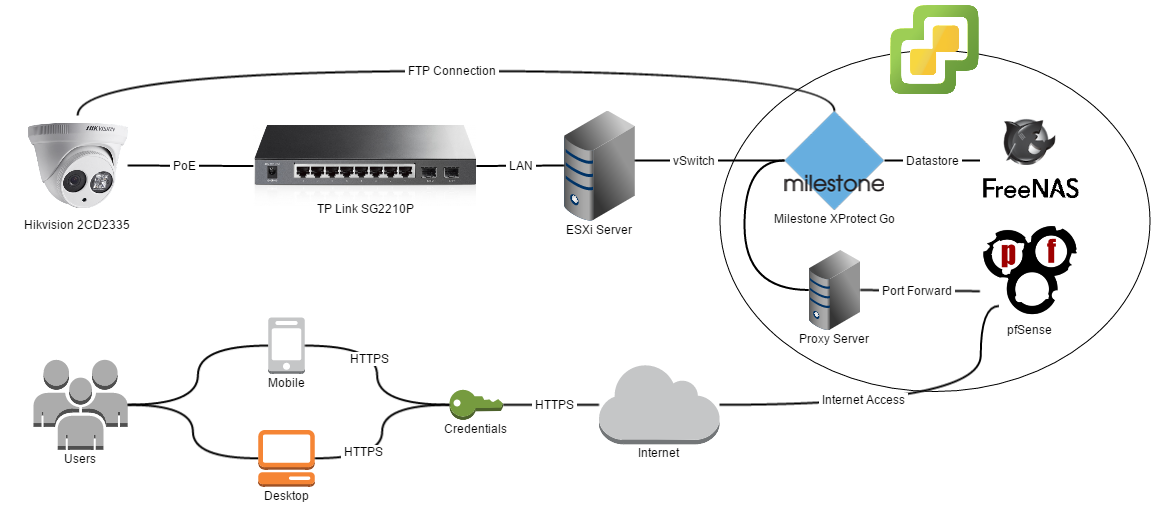
Motion detection is handled by the cameras internally. They are then FTP’d to the server which is running FileZilla under the hikvision username. The path shared is D:\OneDrive\Surveillance.
This is then uploaded to OneDrive.
This script (D:\remove_old_pictures.bat) is run daily by Windows Task Scheduler to delete pictures older than 14 days old.
forfiles /P "D:\\OneDrive\\Surveillance" /D -14 /C "cmd /c del @path"
Each image is prefixed with its name.
Networking
Switch
The cameras are connected to a TL-SG2210P switch.
There are no special configurations.
http://www.tp-link.com.au/download/TL-SG2210P.html#Firmware
Firmware: 160912 (12/09/16)
Configuration backup available on GitHub https://github.com/calvinbui/documentation/blob/master/docs/other/surveillance/switch.cfg
Remote Access and Network Ports
To allow remote access, the gateway of the server is on DMZ (10.0.9.1).
It still has a CAM network adapter but without a gateway which shouldn’t have a problem.
Speed is extremely slow when routed through CloudFlare
pfSense is currently port forwarding to 10.0.9.4.
NGINX from nivl.ac is proxying the Milestone web interface.
- HTTP enabled on 80 and 8081
- HTTPS enabled on 443 and 8082
NGINX Proxy Configuration
location / {
  proxy_pass http://vms-dmz:8081;
  proxy_buffering off;
  proxy_http_version 1.1;
  proxy_set_header Upgrade $http_upgrade;
  proxy_set_header Connection "upgrade";
  proxy_set_header Host $host;
  proxy_set_header X-Forwarded-Proto $scheme;
  proxy_set_header X-Forwarded-For $remote_addr;
  proxy_set_header X-Forwarded-Port $server_port;
  proxy_set_header X-Request-Start $msec;
  proxy_set_header X-Real-IP $remote_addr;
}